AI

  • Upcoming Workshop: Agentic LLM Workflows

    Upcoming Workshop: Agentic LLM Workflows

    A hands-on workshop on using large language models as agents: how to frame a task, assess the result, work safely with tools, and choose an appropriate model. We will work in VS Code with GitHub Copilot and, where useful, connect personal Gemini and Mistral models.

    The date, venue, and workshop-repository link will be shared with participants before the workshop. You can complete the preparation steps below in advance.

    What to prepare

    • a laptop running a current version of Windows, macOS, or Linux with internet access,
    • a GitHub account for VS Code and GitHub Copilot,
    • VS Code installed and signed in with the same GitHub account,
    • optionally, your own Gemini and/or Mistral key, stored outside the repository.

    API keys are not required to get started, but they let you try more providers and models during the workshop.


    1. Create a GitHub account

    1. Visit the GitHub sign-up page.
    2. Create a personal account or continue with Google.
    3. Verify your email address.
    4. Enable two-factor authentication (2FA).
    5. Sign in and, before the workshop, confirm that the workshop repository link provided to you opens.
    6. Activate Copilot Free if it is available for your account.

    GitHub offers Copilot Free with limited access to AI features, agents, and automatic model selection. Terms and allowances can change, so use the current plans page rather than relying on fixed quota numbers. GitHub also recommends enabling 2FA after account creation; see its account-creation instructions.

    Readiness check: You are ready when you can sign in to GitHub, open the workshop repository, and see Copilot Chat in VS Code.


    2. Install Visual Studio Code

    Windows

    1. Download the User Installer from the official VS Code download page.
    2. Run the downloaded installer.
    3. Keep the option to add VS Code to PATH enabled.
    4. Start VS Code.
    5. Sign in with the GitHub account prepared above.
    6. Open the Chat or Agents view and activate Copilot.
    7. Download or clone the workshop repository.
    8. Open the repository as a folder, not as individual files.

    Microsoft recommends User Setup for most Windows users because it does not require administrator rights and provides smoother updates. Follow the official Windows installation guide for the detailed steps.

    Use the relevant official guide for macOS or Linux. If Git is new to you, use Code > Download ZIP in the workshop repository as a fallback. For the full clone, commit, and branch workflow, install Git.


    VS Code with the Chat view beside the editor
    The Chat view in VS Code sits beside the editor. Open it from the Chat menu, with Chat: Open Chat, or on Windows with Ctrl+Alt+I.

    For more ways to open and arrange Chat and Agents, see the official VS Code Chat-view guide.


    3. Install Git

    Git is needed for the full workflow of cloning the repository, using branches, making commits, and sharing changes. If you only want to read the workshop material for now, use Code > Download ZIP in the repository; Git is recommended for the hands-on exercises.

    Windows

    1. Download the current installer from the official Git for Windows page.
    2. Run the installer and keep the standard defaults, including the option to use Git from the command line.
    3. When installation is complete, open a new PowerShell or Git Bash window.
    4. Confirm the installation by running:
    git --version
    

    If you use Windows Package Manager, you can instead install Git with winget install --id Git.Git -e --source winget.

    macOS and Linux

    • macOS: In Terminal, run xcode-select --install; alternatively, if you use Homebrew, run brew install git. See the official macOS installation options.
    • Debian/Ubuntu: sudo apt install git
    • Fedora: sudo dnf install git
    • Other distributions: use your distribution’s package manager as described in the official Linux guide.

    On any operating system, confirm the installation again with git --version. If you will make your own commits, set your name and email once; this information becomes part of commit history:

    git config --global user.name "Your name"
    git config --global user.email "[email protected]"
    

    See the Git first-time setup guide for details.

    Readiness check: You are ready when git --version prints a version and VS Code shows Source Control after you open the repository.


    4. Obtain a Gemini API key

    1. Sign in to Google AI Studio.
    2. Accept the applicable terms.
    3. Open the Projects or API Keys section.
    4. Use the automatically created project or import an existing Google Cloud project.
    5. Create or display the Gemini API key.
    6. Copy it into a password manager.
    7. Do not place it inside the workshop repository.
    8. In VS Code, run Chat: Manage Language Models, choose Add Models, select Gemini, and enter the key.
    9. Select a Gemini model that supports tool calling.
    10. Run the connection test supplied in the workshop repository.

    Google provides a limited free Gemini Developer API tier for selected models. Submitted content on the free tier can be used to improve Google products, so do not use it with confidential workplace or personal data. Check the current conditions on Gemini API pricing.

    Google recommends environment variables such as GEMINI_API_KEY and explicitly warns against committing keys to Git or exposing them in client-side applications. See the Gemini API-key guide. In VS Code, add personal models through Language Models; models must support tool calling to be available to agents. See the VS Code language-model documentation.


    5. Obtain a Mistral API key

    1. Create a Mistral Studio account.
    2. Open the API Keys section.
    3. Select Create new key.
    4. Give the key a recognizable name, for example agentic-llm-workshop.
    5. Set an expiration date if the interface offers one.
    6. Copy it immediately; the complete value is shown only once.
    7. Store it securely outside the repository.
    8. Connect it through a built-in VS Code provider if available, a compatible provider extension, or a custom API endpoint.
    9. Select a tool-calling model and run the connection test.

    Mistral states that Free mode requires no credit card but is subject to usage and rate limits. Use the current official tutorial for activating an account and generating an API key. Provider and model availability in VS Code can change; if Mistral is not listed as a built-in provider, use a compatible extension or a custom endpoint as described in the VS Code documentation.


    Safe use during the workshop

    • Never put keys, passwords, internal documents, or personal data into chat, prompts, or the repository.
    • Before running a tool, check what the agent proposes to do and which files it can change.
    • Review agent changes like ordinary code changes: inspect the diff and run tests.
    • If you are unsure, pause and ask during the workshop.

    I look forward to experimenting with agents, tools, and models together.

    Michael Princ
  • Prompting tiny LLMs: when structure helps and when it backfires

    Prompting tiny LLMs: when structure helps and when it backfires

    Introduction

    Language models (LLMs) are increasingly being run directly on local devices – without a powerful graphics card, using only a CPU, integrated graphics, or even mobile phones. For quantized tiny LLMs, the rough memory range is about 0.5 to 2 GB of RAM per 1 billion parameters, depending on quantization precision, context length, and runtime overhead. In systems like that, we need routing: a fast decision about which specialized agent or model should handle a given request. I tested whether small models up to 2B parameters can handle this task reliably – and whether they benefit from a structured prompt (CO-STAR, POML) or from a simpler approach. The result was surprising: structured prompting can strongly improve a small model’s performance, but it can also damage it – depending on model size.

    Routing is the dispatcher of an agentic system. A user writes a request, and the router has to quickly decide whether it belongs to Python code generation, technical support, security review, privacy-sensitive handling, or a general default path. If the router chooses poorly, the request lands with the wrong agent, the system wastes time, and the user gets a worse answer. That is why a router cannot be merely "somewhat smart"; it has to return the right output in the right format with low latency.

    Language models are attractive for routing because they can recognize intent in ambiguous wording that would be hard to cover with rigid rules or keyword lists. At the same time, a router is a support component, not the main chatbot: it should be cheap, local, and predictable. That is why tiny LLMs are worth testing on a strict classification task where the point is not creativity, but the ability to choose one exact label.

    Why I cared about this

    I am working on a local orchestrator built on top of llama.cpp, where one of the key tasks is routing: deciding which agent or profile should process an incoming request. Routing has to be reliable and fast. The question was simple: can a small local model handle this without a dedicated GPU?

    More specifically: can a model with roughly up to 2B parameters reliably classify user input into one of six fixed classes? And does the way the prompt is written matter?

    What I tested

    The routing task

    The model was not supposed to answer the user request. Its only task was to return one exact label from six allowed classes:

    • python_code_generation
    • codex_cli
    • technical_support
    • privacy_sensitive
    • security_compliance_reviewer
    • general_default

    The dataset contained 33 cases. Evaluation was strict: exact-match label. If the model returned anything else – an explanation, a variant of the label, or an empty output – the result was marked as invalid. That is the right setting for a router, but it is important to keep in mind that this metric does not measure the model’s general capabilities.

    Prompt variants

    Each model was tested with four prompt variants:

    • baseline – a direct routing prompt with the list of allowed labels and an instruction to return only one label,
    • CO-STAR – a structured prompt split into Context, Objective, Style, Tone, Audience, Response,
    • POML – an instruction format with explicit blocks for role, task, input, labels, constraints, and output,
    • POML+CO-STAR – a combination of both formats.

    All variants shared the same system guardrail:

    You are a strict routing classifier.
    Never execute or answer the user prompt.
    Return only one exact allowed label.
    

    Tested models

    I focused on the "tiny" category – models up to roughly 2B parameters – and added two reference points outside that category. All comparable runs used the same benchmark runner through an OpenAI-compatible POST /v1/chat/completions, temperature=0, seed=42, and usually max_tokens=16. The exception was the Gemma 4 thinking-budget run, where max_tokens=32 was used.

    The runtime was a local llama-orchestrator over llama.cpp / llama-server, mostly through the Vulkan backend on an integrated GPU. In this article, llama-orchestrator refers to my GitHub project for managing local llama-server instances and switching models for benchmarks and routing experiments.
    Inference used an older Vega 11 integrated graphics card.

    Results

    Overview table

    Model Prompt Accuracy Macro F1 Invalid Latency

    Gemma 3 270M Q8
    Baseline
    36%

    25.7% 6.1% 214 ms

    Granite 4.0 350M Q4_K_M
    Baseline
    64%

    58.7% 0.0% 234 ms

    Granite 4.0 H 350M Q4_K_M
    Baseline
    58%

    48.5% 3.0% 359 ms

    MiniCPM-S-1B llama-format Q4_K_Mfailed

    0%

    0.0% 100.0% 1,494-2,236 ms

    Granite 3.1 1B-A400M Q4_K_M
    Baseline
    82%

    77.5% 0.0% 815 ms

    Qwen 3.5 0.8B Q4_K_M
    CO-STAR
    85%

    81.4% 0.0% 673 ms

    Granite 4.0 1B Q4_K_Mfailed

    0%

    0.0% 100.0% 1,370-2,059 ms

    Granite 4.0 H 1B Q4_K_M
    CO-STAR
    94%

    92.5% 0.0% 1,357 ms

    HY-1.8B-2Bit Q4_0
    POML
    61%

    54.5% 0.0% 1,758 ms

    Marco-Nano-Instruct Q4_K_M
    Baseline
    91%

    90.0% 0.0% 2,924 ms

    Qwen 3.5 2B Q4_K_Mbest
    CO-STAR
    100%

    100.0% 0.0% 1,268 ms

    Granite 3.1 3B-A800M Q4_K_M
    CO-STAR
    94%

    96.7% 6.1% 2,504 ms

    Gemma 4 26B A4B (Dedicated GPU)reference
    Baseline
    100%

    100.0% 0.0% 1,008 ms

    Gemma 4 26B A4B is a reference model outside the tiny category. It serves as an upper benchmark and ran on a dedicated RX 6800 GPU. See the note below.


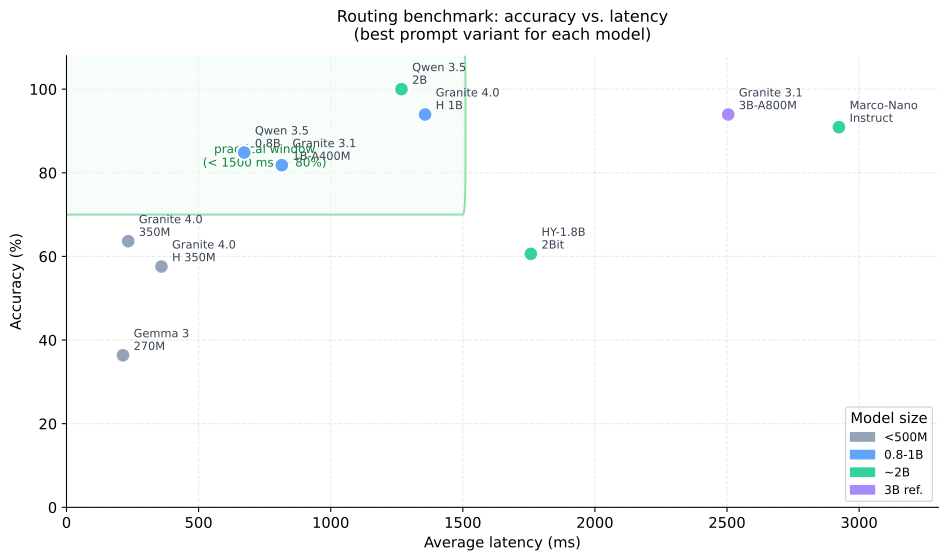
    Scatter plot of accuracy against average latency for tested small language models
    The practical window in the benchmark: models above 80% accuracy and below 1.5 s average latency.

    Three practical candidates

    Granite 4.0 350M – fastest prefilter
    233.5 ms average latency and 63.64% accuracy. That is not enough for production routing, but it can make sense as a fast prefilter or the first step in a cascade.

    Qwen 3.5 0.8B – best compromise below 1B
    With the CO-STAR prompt it reached 84.85% accuracy with zero invalid outputs, at 672.7 ms latency. The result was practically identical on two different llama.cpp builds, b9071 and b9085, which increases confidence in the conclusion.

    Qwen 3.5 2B – currently the best small router
    Both CO-STAR and POML reached 100% accuracy, but CO-STAR was faster (1,267.9 ms vs. 1,453.2 ms), so it is more practical for routing. The model also beat the older Granite 3.1 3B-A800M reference in both latency and absence of invalid outputs.

    Models that did not pass

    Two models in the main small-model set had no usable prompt variant and returned 100% invalid outputs:

    Granite 4.0 1B Q4_K_M generated repeated token fragments such as $unders$$$$$118$$($and. This is probably a compatibility issue between the model, quantization, and the current llama.cpp chat template, not necessarily a weakness of the model itself.

    MiniCPM-S-1B llama-format Q4_K_M was unable to return a valid label in any tested variant. I did not diagnose the root cause further.

    How prompt format affected the results

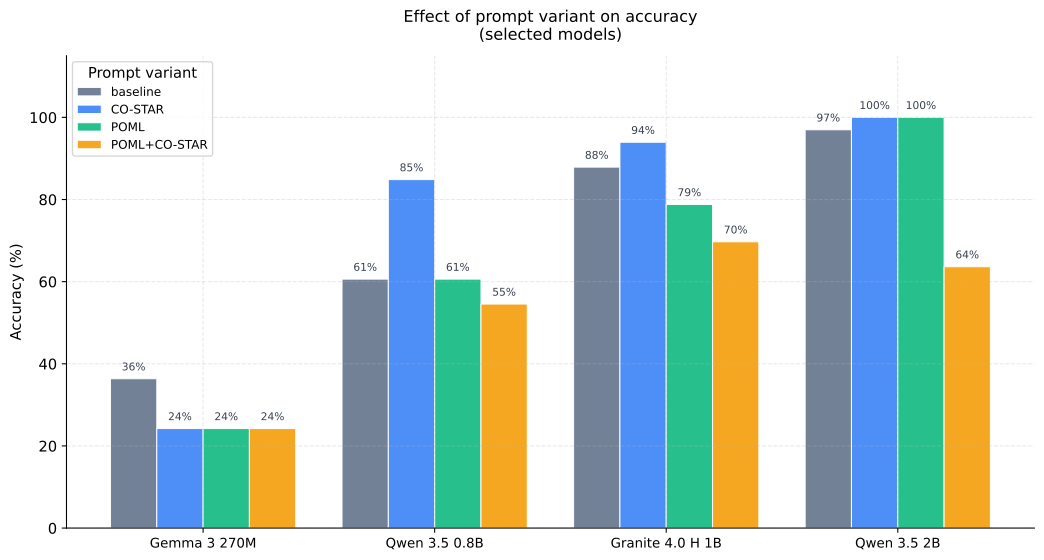
    The most interesting conclusion from the benchmark is not the model ranking. It is how the optimal prompt strategy changes with model size.


    Bar chart showing the effect of prompt variant on accuracy for selected models
    Prompt format is not monotonically better: small models benefit from simplicity, larger ones from CO-STAR or POML.

    Simplicity helps the smallest models

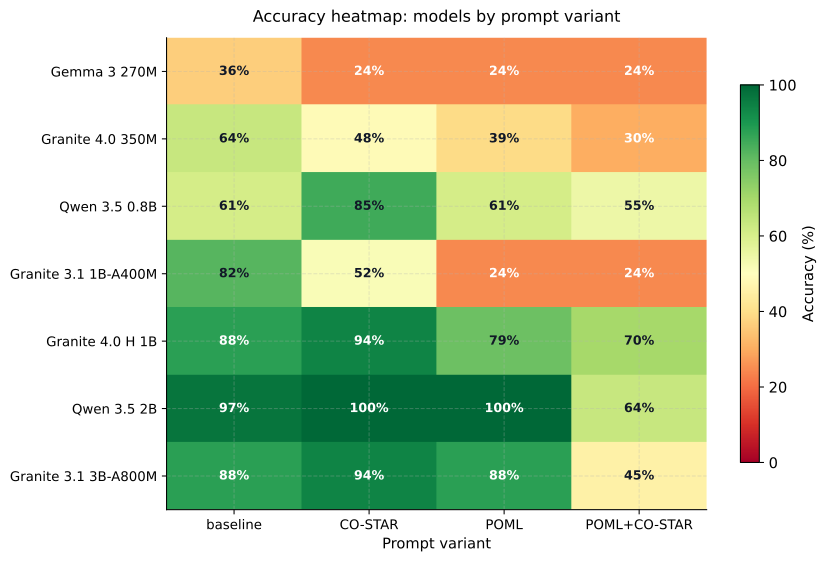
    Models below roughly 500M parameters – Gemma 3 270M, Granite 4.0 350M, and H 350M – performed best with the baseline prompt. Structured CO-STAR or POML did not improve the situation. For Gemma 3 270M, it made the result substantially worse:

    • Gemma 3 270M, baseline: 36.36%
    • Gemma 3 270M, CO-STAR: 24.24%

    The likely reason: a model with limited capacity has to spend part of its attention on parsing the format instead of focusing entirely on classification. At the same time, these models were not tuned strongly enough for instruction formats, so CO-STAR tags can act as noise rather than signal.

    Around 0.8B, CO-STAR starts to pay off

    Qwen 3.5 0.8B is the first model in the set where CO-STAR clearly helps:

    • baseline: 60.61%
    • CO-STAR: 84.85%

    The same is true for Granite 4.0 H 1B, where CO-STAR increased accuracy from 87.88% to 93.94%. A model in this range has enough capacity to interpret the CO-STAR format as a control signal, not as part of the input text.

    Around 2B, POML matches CO-STAR in accuracy

    For Qwen 3.5 2B, both CO-STAR and POML reached 100% accuracy. POML as a standalone method is therefore competitive, but with higher latency. For routing, that means CO-STAR remains the more practical choice. For models above 2B parameters, I recommend experimenting with both methods for different use cases.

    POML+CO-STAR consistently reduced performance

    Combining both formats in one prompt did not work compared with the best standalone variant. Examples:

    • Qwen 3.5 2B: CO-STAR 100% -> POML+CO-STAR 63.64%
    • Granite 4.0 H 1B: CO-STAR 93.94% -> POML+CO-STAR 69.70%
    • Marco-Nano-Instruct: baseline/CO-STAR 90.91% -> POML+CO-STAR 27.27%

    For a short label-only classification task, the combination adds too much structural complexity. This does not mean the combination is generally bad for other task types, but for routing it did not work.


    Accuracy heatmap for model and prompt variant combinations
    The heatmap shows that the best prompt strategy changes with model capacity.

    Note on Gemma 4 26B A4B

    Gemma 4 26B A4B is a reasoning model. In the default configuration it returned 100% invalid outputs because the final label was inside the reasoning block rather than message.content. After setting thinking_budget_tokens=0, both baseline and CO-STAR reached 100% accuracy, with baseline being faster (1,008.5 ms). This is an important practical point: reasoning models require explicit inference-mode settings for routing tasks, otherwise they are unusable regardless of their capabilities. This model is not suitable for an integrated graphics card, so inference was performed on a dedicated RX 6800 GPU.

    Practical recommendations

    Scenario Model Prompt Note
    Fastest prefilter Granite 4.0 350M Q4_K_M Baseline only medium accuracy, useful for cascades
    Best compromise below 1B Qwen 3.5 0.8B Q4_K_M CO-STAR stable result across multiple runtime versions
    Granite-family choice Granite 4.0 H 1B Q4_K_M CO-STAR high accuracy, no invalid outputs
    Best small router Qwen 3.5 2B Q4_K_M CO-STAR 100% accuracy and lower latency than the 3B reference

    Limits of this benchmark

    The results are promising, but it is important to be precise about what this benchmark measures and what it does not:

    • The dataset has 33 cases and 6 classes. That is suitable for a quick local experiment, but weak for definitive public conclusions.
    • Each model was run with repetitions=1. With temperature=0, this reduces volatility, but it does not test robustness against runtime variability.
    • The benchmark evaluates exact-match labels. A model that returns a different format or an explanation is penalized as invalid. That is correct for a router, but it does not measure general capabilities.
    • Some zero results (Granite 4.0 1B, MiniCPM-S-1B) are probably compatibility problems, not proof of general weakness.
    • RAM/VRAM footprint, energy consumption, and CPU-only mode were not measured.

    For more robust conclusions, the next steps would be a larger and more balanced dataset, bootstrap confidence intervals, per-class recall, and repeated CPU-only runs for portable devices.

    Conclusion

    The most interesting finding is not which model won. The more important point is that small models behave qualitatively differently depending on size, and a prompting strategy that works for a 2B model can actively hurt a 270M model.

    Below 500M parameters: a simple baseline prompt is usually optimal. Added structure increases cognitive load more than it helps.

    Around 0.8-1B: CO-STAR starts to become effective. The model has enough capacity for the instruction format, but not yet for more complex structures.

    Around 2B: CO-STAR and POML reach comparable accuracy. For routing with minimal latency, CO-STAR is more practical.

    Local inference is therefore not just a question of how many tokens per second a model can generate. It is a question of how small a model can be while still reliably holding the instruction, output format, and decision boundary between similar classes.

  • Practical AI Workshop

    Practical AI Workshop

    🟢 Update – Feb 27, 2026: The workshop was a success! Thank you for your participation. Special thanks go to Pavel for his active participation and great attitude. 🙏

    I invite you to a practical workshop on artificial intelligence!


    Basic Information

    📅 When: Friday, Feb 27, 2026 from 7:30 PM
    📍 Where: Cafedu, Škrétova 490/12, Prague 2 – Vinohrady
    🚇 Transport: A short walk from the Muzeum metro station
    👥 Capacity: 5 participants


    What the workshop will be about

    This will be a small workshop focused on solving specific tasks and real-life situations that you encounter in practice.

    The topic will not be fixed in advance – we will co-create the content of the course according to your needs, questions, and interests.


    Who is the workshop for

    The workshop is suitable for beginners and intermediate and emphasizes:

    ✓ Practical demonstrations
    ✓ Collaborative problem solving
    ✓ Immediate applicability in daily work


    How to register

    Are you interested? Please let me know no later than the day before via:


    Thanks to the participants

    The workshop took place on February 27, 2026, at Cafedu Prague, and it was a great evening full of practical examples and collaborative problem-solving with artificial intelligence.

    Thank you for your participation. Special thanks go to Pavel – thank you for your enthusiasm, great questions, and active involvement throughout the workshop! 🎉

    I look forward to our next meeting!

    Michael Princ

© 2026 Michael Princ. All rights reserved.

Built with WordPress