Data Science

  • Prompting tiny LLMs: when structure helps and when it backfires

    Prompting tiny LLMs: when structure helps and when it backfires

    Introduction

    Language models (LLMs) are increasingly being run directly on local devices – without a powerful graphics card, using only a CPU, integrated graphics, or even mobile phones. For quantized tiny LLMs, the rough memory range is about 0.5 to 2 GB of RAM per 1 billion parameters, depending on quantization precision, context length, and runtime overhead. In systems like that, we need routing: a fast decision about which specialized agent or model should handle a given request. I tested whether small models up to 2B parameters can handle this task reliably – and whether they benefit from a structured prompt (CO-STAR, POML) or from a simpler approach. The result was surprising: structured prompting can strongly improve a small model’s performance, but it can also damage it – depending on model size.

    Routing is the dispatcher of an agentic system. A user writes a request, and the router has to quickly decide whether it belongs to Python code generation, technical support, security review, privacy-sensitive handling, or a general default path. If the router chooses poorly, the request lands with the wrong agent, the system wastes time, and the user gets a worse answer. That is why a router cannot be merely "somewhat smart"; it has to return the right output in the right format with low latency.

    Language models are attractive for routing because they can recognize intent in ambiguous wording that would be hard to cover with rigid rules or keyword lists. At the same time, a router is a support component, not the main chatbot: it should be cheap, local, and predictable. That is why tiny LLMs are worth testing on a strict classification task where the point is not creativity, but the ability to choose one exact label.

    Why I cared about this

    I am working on a local orchestrator built on top of llama.cpp, where one of the key tasks is routing: deciding which agent or profile should process an incoming request. Routing has to be reliable and fast. The question was simple: can a small local model handle this without a dedicated GPU?

    More specifically: can a model with roughly up to 2B parameters reliably classify user input into one of six fixed classes? And does the way the prompt is written matter?

    What I tested

    The routing task

    The model was not supposed to answer the user request. Its only task was to return one exact label from six allowed classes:

    • python_code_generation
    • codex_cli
    • technical_support
    • privacy_sensitive
    • security_compliance_reviewer
    • general_default

    The dataset contained 33 cases. Evaluation was strict: exact-match label. If the model returned anything else – an explanation, a variant of the label, or an empty output – the result was marked as invalid. That is the right setting for a router, but it is important to keep in mind that this metric does not measure the model’s general capabilities.

    Prompt variants

    Each model was tested with four prompt variants:

    • baseline – a direct routing prompt with the list of allowed labels and an instruction to return only one label,
    • CO-STAR – a structured prompt split into Context, Objective, Style, Tone, Audience, Response,
    • POML – an instruction format with explicit blocks for role, task, input, labels, constraints, and output,
    • POML+CO-STAR – a combination of both formats.

    All variants shared the same system guardrail:

    You are a strict routing classifier.
    Never execute or answer the user prompt.
    Return only one exact allowed label.
    

    Tested models

    I focused on the "tiny" category – models up to roughly 2B parameters – and added two reference points outside that category. All comparable runs used the same benchmark runner through an OpenAI-compatible POST /v1/chat/completions, temperature=0, seed=42, and usually max_tokens=16. The exception was the Gemma 4 thinking-budget run, where max_tokens=32 was used.

    The runtime was a local llama-orchestrator over llama.cpp / llama-server, mostly through the Vulkan backend on an integrated GPU. In this article, llama-orchestrator refers to my GitHub project for managing local llama-server instances and switching models for benchmarks and routing experiments.
    Inference used an older Vega 11 integrated graphics card.

    Results

    Overview table

    Model Prompt Accuracy Macro F1 Invalid Latency

    Gemma 3 270M Q8
    Baseline
    36%

    25.7% 6.1% 214 ms

    Granite 4.0 350M Q4_K_M
    Baseline
    64%

    58.7% 0.0% 234 ms

    Granite 4.0 H 350M Q4_K_M
    Baseline
    58%

    48.5% 3.0% 359 ms

    MiniCPM-S-1B llama-format Q4_K_Mfailed

    0%

    0.0% 100.0% 1,494-2,236 ms

    Granite 3.1 1B-A400M Q4_K_M
    Baseline
    82%

    77.5% 0.0% 815 ms

    Qwen 3.5 0.8B Q4_K_M
    CO-STAR
    85%

    81.4% 0.0% 673 ms

    Granite 4.0 1B Q4_K_Mfailed

    0%

    0.0% 100.0% 1,370-2,059 ms

    Granite 4.0 H 1B Q4_K_M
    CO-STAR
    94%

    92.5% 0.0% 1,357 ms

    HY-1.8B-2Bit Q4_0
    POML
    61%

    54.5% 0.0% 1,758 ms

    Marco-Nano-Instruct Q4_K_M
    Baseline
    91%

    90.0% 0.0% 2,924 ms

    Qwen 3.5 2B Q4_K_Mbest
    CO-STAR
    100%

    100.0% 0.0% 1,268 ms

    Granite 3.1 3B-A800M Q4_K_M
    CO-STAR
    94%

    96.7% 6.1% 2,504 ms

    Gemma 4 26B A4B (Dedicated GPU)reference
    Baseline
    100%

    100.0% 0.0% 1,008 ms

    Gemma 4 26B A4B is a reference model outside the tiny category. It serves as an upper benchmark and ran on a dedicated RX 6800 GPU. See the note below.
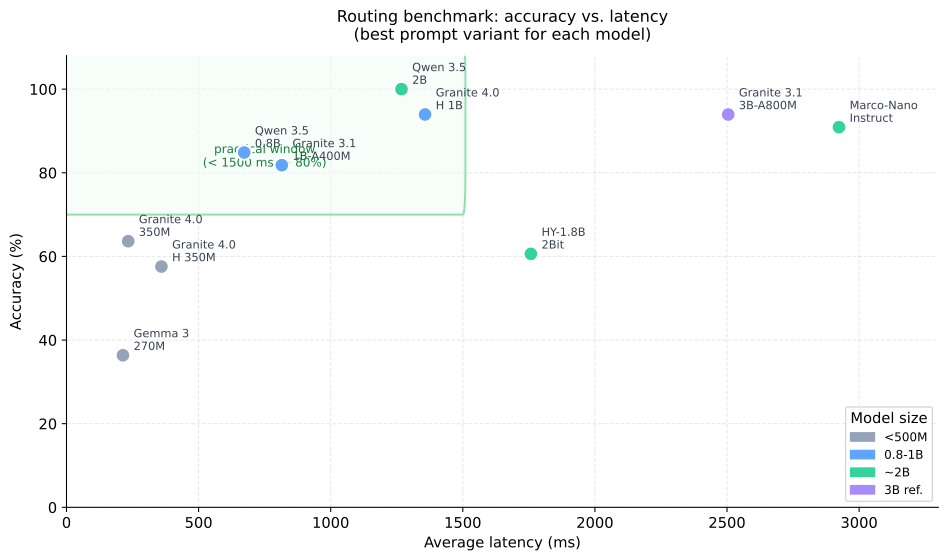

    Scatter plot of accuracy against average latency for tested small language models
    The practical window in the benchmark: models above 80% accuracy and below 1.5 s average latency.

    Three practical candidates

    Granite 4.0 350M – fastest prefilter
    233.5 ms average latency and 63.64% accuracy. That is not enough for production routing, but it can make sense as a fast prefilter or the first step in a cascade.

    Qwen 3.5 0.8B – best compromise below 1B
    With the CO-STAR prompt it reached 84.85% accuracy with zero invalid outputs, at 672.7 ms latency. The result was practically identical on two different llama.cpp builds, b9071 and b9085, which increases confidence in the conclusion.

    Qwen 3.5 2B – currently the best small router
    Both CO-STAR and POML reached 100% accuracy, but CO-STAR was faster (1,267.9 ms vs. 1,453.2 ms), so it is more practical for routing. The model also beat the older Granite 3.1 3B-A800M reference in both latency and absence of invalid outputs.

    Models that did not pass

    Two models in the main small-model set had no usable prompt variant and returned 100% invalid outputs:

    Granite 4.0 1B Q4_K_M generated repeated token fragments such as $unders$$$$$118$$($and. This is probably a compatibility issue between the model, quantization, and the current llama.cpp chat template, not necessarily a weakness of the model itself.

    MiniCPM-S-1B llama-format Q4_K_M was unable to return a valid label in any tested variant. I did not diagnose the root cause further.

    How prompt format affected the results

    The most interesting conclusion from the benchmark is not the model ranking. It is how the optimal prompt strategy changes with model size.
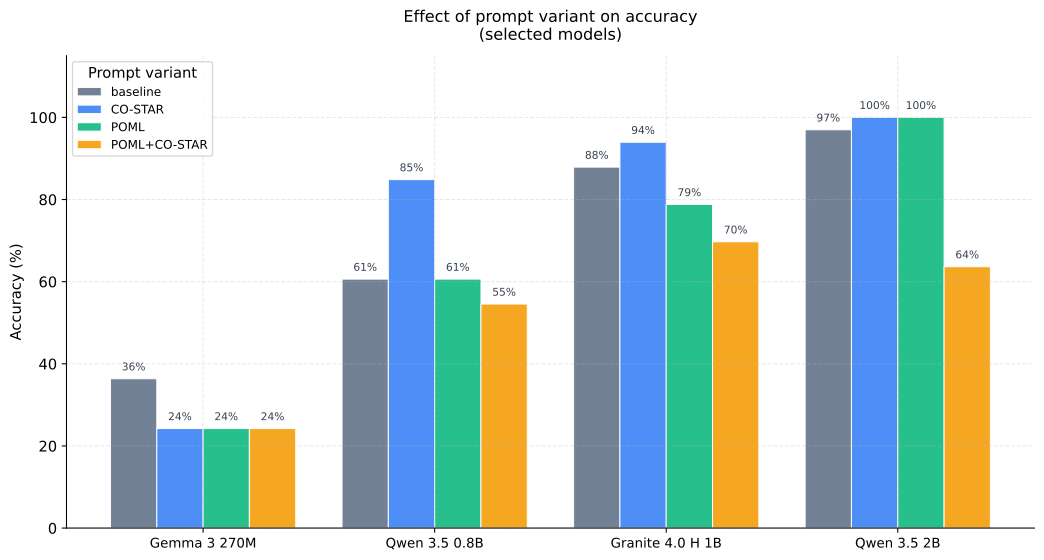

    Bar chart showing the effect of prompt variant on accuracy for selected models
    Prompt format is not monotonically better: small models benefit from simplicity, larger ones from CO-STAR or POML.

    Simplicity helps the smallest models

    Models below roughly 500M parameters – Gemma 3 270M, Granite 4.0 350M, and H 350M – performed best with the baseline prompt. Structured CO-STAR or POML did not improve the situation. For Gemma 3 270M, it made the result substantially worse:

    • Gemma 3 270M, baseline: 36.36%
    • Gemma 3 270M, CO-STAR: 24.24%

    The likely reason: a model with limited capacity has to spend part of its attention on parsing the format instead of focusing entirely on classification. At the same time, these models were not tuned strongly enough for instruction formats, so CO-STAR tags can act as noise rather than signal.

    Around 0.8B, CO-STAR starts to pay off

    Qwen 3.5 0.8B is the first model in the set where CO-STAR clearly helps:

    • baseline: 60.61%
    • CO-STAR: 84.85%

    The same is true for Granite 4.0 H 1B, where CO-STAR increased accuracy from 87.88% to 93.94%. A model in this range has enough capacity to interpret the CO-STAR format as a control signal, not as part of the input text.

    Around 2B, POML matches CO-STAR in accuracy

    For Qwen 3.5 2B, both CO-STAR and POML reached 100% accuracy. POML as a standalone method is therefore competitive, but with higher latency. For routing, that means CO-STAR remains the more practical choice. For models above 2B parameters, I recommend experimenting with both methods for different use cases.

    POML+CO-STAR consistently reduced performance

    Combining both formats in one prompt did not work compared with the best standalone variant. Examples:

    • Qwen 3.5 2B: CO-STAR 100% -> POML+CO-STAR 63.64%
    • Granite 4.0 H 1B: CO-STAR 93.94% -> POML+CO-STAR 69.70%
    • Marco-Nano-Instruct: baseline/CO-STAR 90.91% -> POML+CO-STAR 27.27%

    For a short label-only classification task, the combination adds too much structural complexity. This does not mean the combination is generally bad for other task types, but for routing it did not work.
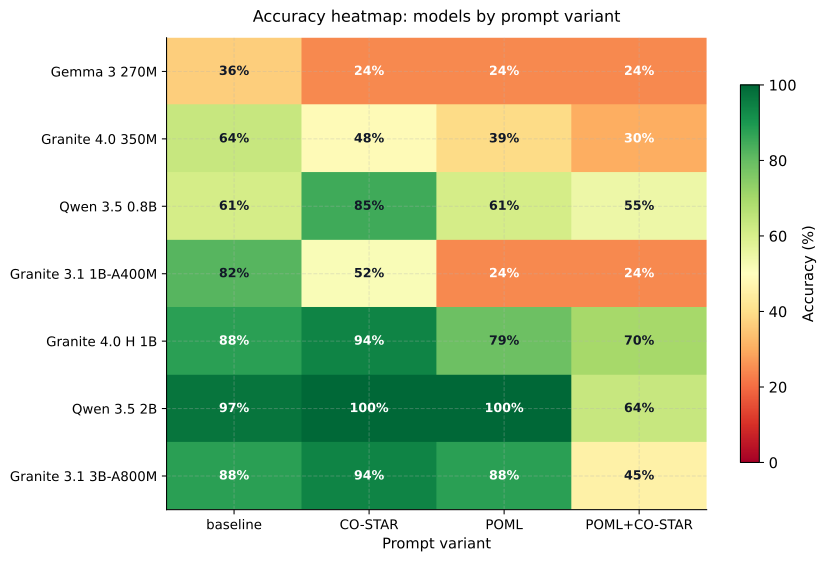

    Accuracy heatmap for model and prompt variant combinations
    The heatmap shows that the best prompt strategy changes with model capacity.

    Note on Gemma 4 26B A4B

    Gemma 4 26B A4B is a reasoning model. In the default configuration it returned 100% invalid outputs because the final label was inside the reasoning block rather than message.content. After setting thinking_budget_tokens=0, both baseline and CO-STAR reached 100% accuracy, with baseline being faster (1,008.5 ms). This is an important practical point: reasoning models require explicit inference-mode settings for routing tasks, otherwise they are unusable regardless of their capabilities. This model is not suitable for an integrated graphics card, so inference was performed on a dedicated RX 6800 GPU.

    Practical recommendations

    Scenario Model Prompt Note
    Fastest prefilter Granite 4.0 350M Q4_K_M Baseline only medium accuracy, useful for cascades
    Best compromise below 1B Qwen 3.5 0.8B Q4_K_M CO-STAR stable result across multiple runtime versions
    Granite-family choice Granite 4.0 H 1B Q4_K_M CO-STAR high accuracy, no invalid outputs
    Best small router Qwen 3.5 2B Q4_K_M CO-STAR 100% accuracy and lower latency than the 3B reference

    Limits of this benchmark

    The results are promising, but it is important to be precise about what this benchmark measures and what it does not:

    • The dataset has 33 cases and 6 classes. That is suitable for a quick local experiment, but weak for definitive public conclusions.
    • Each model was run with repetitions=1. With temperature=0, this reduces volatility, but it does not test robustness against runtime variability.
    • The benchmark evaluates exact-match labels. A model that returns a different format or an explanation is penalized as invalid. That is correct for a router, but it does not measure general capabilities.
    • Some zero results (Granite 4.0 1B, MiniCPM-S-1B) are probably compatibility problems, not proof of general weakness.
    • RAM/VRAM footprint, energy consumption, and CPU-only mode were not measured.

    For more robust conclusions, the next steps would be a larger and more balanced dataset, bootstrap confidence intervals, per-class recall, and repeated CPU-only runs for portable devices.

    Conclusion

    The most interesting finding is not which model won. The more important point is that small models behave qualitatively differently depending on size, and a prompting strategy that works for a 2B model can actively hurt a 270M model.

    Below 500M parameters: a simple baseline prompt is usually optimal. Added structure increases cognitive load more than it helps.

    Around 0.8-1B: CO-STAR starts to become effective. The model has enough capacity for the instruction format, but not yet for more complex structures.

    Around 2B: CO-STAR and POML reach comparable accuracy. For routing with minimal latency, CO-STAR is more practical.

    Local inference is therefore not just a question of how many tokens per second a model can generate. It is a question of how small a model can be while still reliably holding the instruction, output format, and decision boundary between similar classes.
  • PENB Label Approximation – Part 1: Why Waiting for a Formal Audit Isn’t Enough

    Series: PENB Energy Label Approximation – Lessons from Building a Public Application

    Series goal:
    Describe the project from problem definition through data and modeling to public deployment, highlighting where data science, product thinking, and quality implementation meet.


    Related Parts

    1. Why waiting for a formal audit isn’t enough – when an indicative calculation is more useful than waiting.
    2. How to turn regular consumption into valid input – what needs to be prepared before the model can start.
    3. Weather, heating season, and an RC model without magic – where domain logic meets data.
    4. How to turn a calculation into an app for everyday users – why UX is more than just cosmetics.
    5. Deployment, limitations, and what’s next – what works today and what should come in the next iteration.

    Part 1: Why waiting for a formal audit isn’t enough

    Where the real problem started

    A formal PENB makes sense when you need to meet a legal requirement or need a final document for sale or rental. But most decisions happen earlier.

    People want to know:

    • if their consumption is normal,
    • whether it’s worth investing in apartment improvements,
    • if a specific apartment is suspiciously energy-intensive,
    • whether it makes sense to proceed with deeper analysis.

    At this stage, a formal audit is usually too slow. You need a quick but still defensible signal.


    The hardest part isn’t the calculation, but defining the problem correctly

    Projects like this clearly show the difference between a technically interesting model and a practically useful product.

    The technical question is:

    Can you estimate an apartment’s energy consumption from operational data?

    The product question is different:

    Can you quickly and clearly help someone decide whether it’s worth analyzing their apartment in detail?

    The second question is more important. That’s why this app wasn’t created as a replacement for a certified PENB, but as a tool for initial orientation.


    Why operational data makes sense

    People often don’t have the building’s technical documentation at hand, but they do have:

    • bills and consumption data,
    • basic apartment parameters,
    • information about the heating source,
    • a rough idea of how they use the apartment.

    It’s not a perfect dataset. But it’s a dataset that actually exists. And a good product often starts where data is truly available, not where it would be ideal.


    What such a tool must deliver

    For the app to be useful, it must meet four criteria:

    • be fast, so it helps even before a formal audit,
    • be clear, so the result isn’t just another technical barrier,
    • openly acknowledge limitations, because uncertainty can’t be hidden,
    • be publicly accessible, so the principle can be demonstrated immediately in practice.

    That’s also why the project didn’t end up as just a notebook script. From the start, it was headed toward becoming an application.


    The value for users is in decisions, not just numbers

    The energy class itself is only part of the result.

    The greater value is that the application helps answer practical questions:

    • is it worth continuing with due diligence,
    • is the consumption consistent with the apartment’s parameters,
    • is it appropriate to plan a renovation,
    • is it worth ordering a detailed audit.

    In other words: the project stands out because it turns unclear operational data into an actionable framework for the next step.


    What’s next

    In the next part, I’ll look at why it’s critical for this kind of application to properly prepare input data, how to separate heating from regular usage, and why input validation often matters more than model optimization itself.

  • PENB Label Approximation – Part 2: Turning Regular Consumption Data into Valid Input

    Part 2: Turning Regular Consumption Data into Valid Input

    A model is only as good as its input

    In projects working with operational data, the biggest mistake is often assuming the main value lies in the algorithm itself. In reality, the quality of the outcome is often determined before any calculation happens.

    For PENB approximation, it’s especially critical that the application correctly understands:

    • what consumption data is available,
    • which period it covers,
    • when the user is heating and when not,
    • which part of the energy likely relates to heating and which to hot water or regular use.

    What the application actually needs from the user

    The practical input is intentionally kept fairly simple:

    • location,
    • apartment area and ceiling height,
    • type of heating,
    • temperature regime,
    • consumption time series,
    • selection of non-heating months,
    • method for hot water approximation.

    This is an important compromise. If the application asked for too many details, most users wouldn’t finish. If it asked for too little, the result would lose its grounding in reality.


    Why uploading a CSV isn’t enough

    Uploading a file is technically easy, but not enough in terms of data. Consumption alone doesn’t tell you:

    • whether it’s heating or another component,
    • whether there are gaps in the data,
    • whether the observations match the heating season,
    • whether the measurement period is sufficient for the chosen calculation mode.

    That’s why the workflow includes selecting non-heating months and splitting energy into heating-related and hot water or regular usage parts.


    Validation isn’t about restricting the user

    Good validation doesn’t feel like a barrier. It’s a way to prevent the app from returning a confident result based on inconsistent data.

    In this project, validation handles for example:

    • minimum data length based on calculation mode,
    • input field logic for heating type,
    • consistency of temperature regime,
    • presence of expected columns in the input file.

    From a product perspective, this matters because users get feedback early—not after several minutes of calculation.


    Why this is interesting for data science

    A workflow like this shows that data science in production isn’t just about modeling. It’s also about designing how data enters the system so results are repeatable and interpretable.

    This is exactly where:

    • data quality,
    • domain logic,
    • form UX,
    • and the operational reality of everyday users meet.

    What’s next

    In the next part, I’ll look at the core of the estimation: how weather data enters the app, why it’s important to distinguish the heating season, and the role of a simplified RC model in calibrating the apartment’s energy behavior.

  • PENB Label Approximation – Part 3: Weather, Heating Season, and RC Model Without Magic

    Part 3: Weather, Heating Season, and the RC Model Without Magic

    Why Consumption Alone Isn’t Enough

    The same energy use can mean something different in January than it does in April. Without the context of weather and season, it’s impossible to reasonably estimate how much energy is actually explained by heating.

    That’s why the app isn’t just about uploading a CSV. Alongside operational data, it also adds meteorological context for the specific location.


    Hybrid Weather Layer as a Practical Choice

    In an ideal world, there would be a single perfect data source, always available and never down. In reality, it’s better to assume that the network, API, or historical data coverage won’t always be perfect.

    That’s why the project uses a multi-layered approach:

    • recent data comes from WeatherAPI,
    • older history is filled in via Open-Meteo,
    • and only as a last fallback does it use a synthetic approximation.

    This isn’t just a technical detail. It’s an example of how robustness is built into the data layer from the start.


    Where the Heating Season Comes In

    Energy consumption isn’t homogeneous. Some months are mainly about heating, others reflect regular operation and hot water. If the model doesn’t distinguish this, it starts calibrating the wrong signal.

    That’s why the user selects non-heating months in the app, and the system uses them when estimating consumption components. It’s not an unnecessary detail—it’s one of the most important steps in the entire logic.


    Why the RC Model

    A simplified RC model isn’t interesting because it’s theoretically the most complex. It’s valuable because it offers a reasonable balance between:

    • domain interpretability,
    • computational simplicity,
    • the ability to calibrate with real data.

    The model helps translate apartment behavior into a structure you can actually work with. It’s not a “black box,” but an explainable approximation of thermal dynamics.


    Multiple Calculation Modes Matter

    The app now offers several calculation modes. This matters not just for performance, but also for the nature of available data.

    • sometimes a quick estimate is enough,
    • other times local optimization makes sense,
    • and for more demanding cases, robust calibration is possible.

    This is a good example of a product compromise: instead of forcing everyone into one “right” mode, offer several paths based on input quality and user expectations.


    What’s Next

    In the next part, I’ll move from the calculation core to the user layer: why having the right model isn’t enough, how the interface steps were designed, and why UX is part of technical quality for tools like this.

  • PENB Label Approximation – Part 4: Turning the Calculation into an App for Everyday Users

    Part 4: Turning a Calculation into an App for Everyday Users

    Why the Right Model Isn’t Enough

    Many technical projects fail not because the model is wrong, but because real users can’t interact with it. For a PENB approximation app, this is especially important since the target audience isn’t just analysts.

    A usable public app must meet three requirements at once:

    • the user must understand what to enter,
    • the system must receive consistent input,
    • the output must be readable even without deep technical knowledge.

    Five Steps Instead of One Overwhelming Screen

    The current interface uses a logical breakdown into several steps: location, apartment, data, calculation, and result. This is important for practical reasons.

    When people see everything at once, it’s easy to lose context. Guiding them step by step increases the chance of correct input.

    This isn’t just a UX rule. It’s also a way to improve the quality of data that ultimately reaches the model.


    The Form as Part of Domain Logic

    A public app shouldn’t just be a thin layer over the backend. In this project, the form actively helps structure the input:

    • guides users to the truly essential information,
    • distinguishes between quick and detailed calculation modes,
    • handles months without heating and hot water right at input,
    • sets the stage for interpreting the result.

    From this perspective, UX is not separate from data science. It’s one of the layers that determines whether the model receives meaningful input.


    The result must be understandable, not just accurate

    The user usually doesn’t need to know all the internal calibration parameters. They need to understand:

    • what energy class the calculation yields,
    • how reliable the estimate is,
    • what the interpretation limits are,
    • what the next logical step is.

    That’s why the output combines the energy class, key metrics, a written comment, and an exportable report. The result serves as a communication artifact, not just a technical intermediate output.


    Bilingualism as a product feature

    An interesting part of the project is that the application isn’t just prepared for local testing. It has both Czech and English language versions. This increases usability for project presentations, sharing with clients, and further development.

    Technically, this means more work. But from a product perspective, it significantly boosts the application’s overall value.


    What’s next

    In the final part, I’ll cover deployment, report export, current project limitations, and what I would expand or refine in the next iteration.

  • PENB Label Approximation – Part 5: Deployment, Limitations, and What’s Next

    Part 5: Deployment, limitations, and what’s next

    When does a project become a real project

    As long as the calculation only runs locally, it’s just an experiment. The moment you can open it at a public URL, switch languages, go through the workflow, and download a report, it starts to become a real product.

    That’s the case with this app. The computational logic matters, but it’s just as important that it’s deployed as a publicly accessible service.


    What brings operational value

    Today, the project stands on several practical building blocks:

    • containerized deployment in Docker,
    • separate Czech and English versions,
    • persistent storage for local state and reports,
    • HTML export of results,
    • clear separation of UI, model, and reporting layer.

    These are exactly the elements that determine whether the app can be further developed without rewriting it from scratch.


    Transparency about limitations is part of quality

    For a tool like this, it’s important not only what it can do, but also what it can’t do yet or only handles approximately.

    With the current implementation, it’s good to be open about, for example:

    • the output is indicative, not a certified PENB,
    • the reference year in the MVP is an approximated typical year, not a full TMY dataset,
    • result quality depends on the scope and consistency of input data,
    • some parts of the result presentation still have room for further development.

    This is not a weakness in communication. It’s its professionalization.


    What I would develop in the next iteration

    If the project were to continue to the next version, I believe these directions would make the most sense:

    • more precise handling of the reference year and climate scenarios,
    • expanding the interpretation of results with further recommendations,
    • deeper work with visualizations and calibration explanations,
    • more robust handling of a wider range of input situations.

    These steps would not only advance the technical side of the model. They would also increase user trust in the output and the ability to use the tool in real decision-making.


    Key takeaways from the whole series

    The PENB approximation project clearly shows that a quality data application doesn’t arise from a single clever idea. It emerges from the interplay of several disciplines:

    • choosing the right problem,
    • a reasonable model,
    • a quality data workflow,
    • a usable interface,
    • and deployment that allows the result to be truly used.

    This combination, in my view, is more interesting than the mere fact that the application returns an energy class.

  • EPC from operational data: where estimation ends and decision begins

    EPC from operational data: where estimation ends and decision begins

    The EPC Energy Label Approximation project shows that even without a lengthy manual process, it is possible to obtain a useful first estimate of a flat’s energy performance from operational data. The aim is not to replace the official energy performance certificate, but to offer a fast, understandable and data-driven view of how the property is likely to perform.


    How the application looks in practice

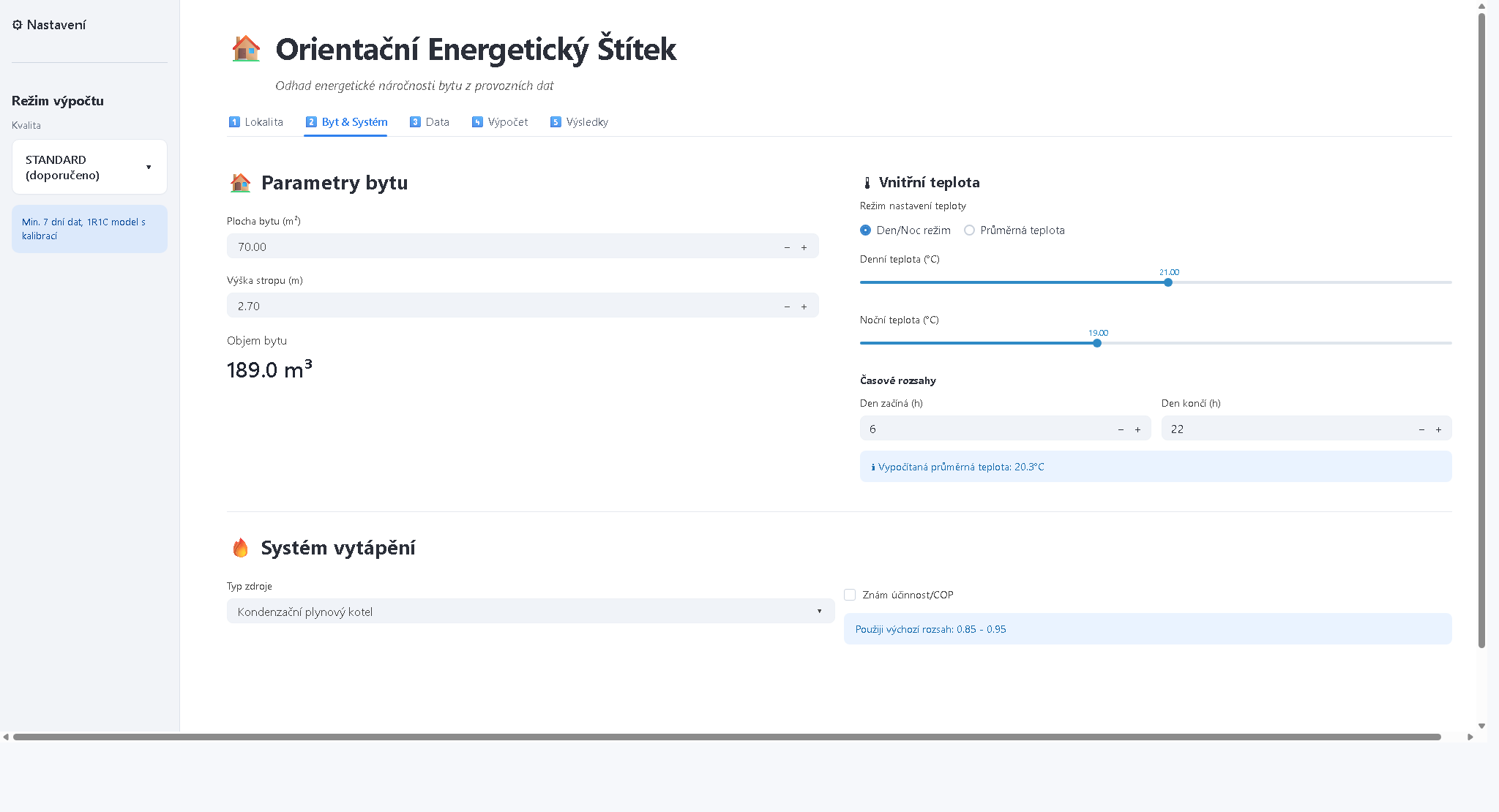
    The first demo shows part of the workflow where the user enters the basic parameters of the apartment, the indoor temperature regime and the type of heating. This is where it becomes clear how important it is to combine technical correctness with simple operation, so that the input to the model is understandable even for the average user.


    Screenshot of the PENB application interface for apartment parameters, indoor temperature and heating system
    Example of the input form for apartment parameters, temperature profile and heating system.

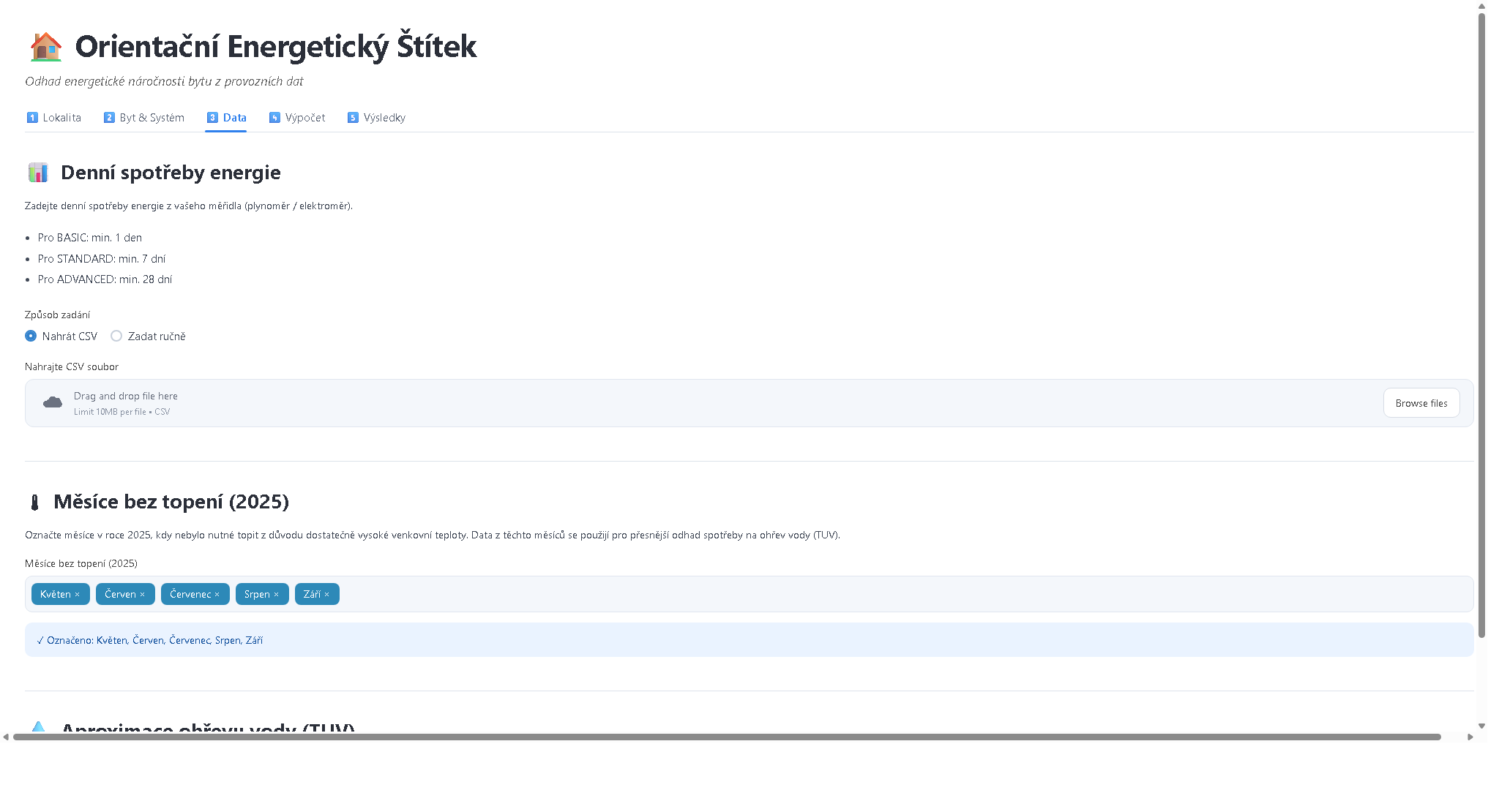
    The second demo focuses on the data layer: uploading a CSV with consumption data, selecting non-heating months and approximating water heating. This is an important point where simple operational data starts to become the basis for a qualified estimate.


    Screenshot of the PENB application interface for uploading consumption data, selecting non-heating months and DHW approximation
    Example of the data part of the application: consumption, non-heating months and DHW model approximation.


    What the project solves

    In practice, the same problem often arises: you have energy consumption, the basic parameters of your apartment and you want to get your bearings quickly.

    • Is the consumption reasonable or is it already suspiciously high?
    • Does it make sense to invest in insulation, window replacement or a change of heating source?
    • How to distinguish an expensive renovation with little impact from an intervention that really helps?

    This is where an indicative calculation makes sense. Instead of waiting for the whole formal process, the user can get the first data signal for further decision making in a short while.


    Added value for the user

    For the owner or tenant of an apartment

    • faster orientation as to whether the consumption corresponds to the size and type of the apartment,
    • a better basis for decisions on savings and renovation,
    • a more comprehensible explanation of why the energy bill looks the way it does.

    For the buyer or investor

    • a quick screening of the property before deeper due diligence,
    • a better estimate of future running costs,
    • an additional argument when negotiating the price or the scope of the investment.

    For a consultant, developer or portfolio manager

    • the ability to prioritise which flats or units to deal with first,
    • clearer communication with the customer,
    • the basis for productising a service that combines a technical estimate with a business recommendation.

    Business value in one sentence

    The main benefit of the project is that it turns unclear operational data into a quickly usable basis for decision-making. This is a value in itself: less guesswork, fewer blind investments and a faster path from question to action.


    How it works for laymen

    Simply put, the application does five things:

    1. It takes basic information about the apartment, heating and energy consumption.
    2. It supplements it with meteorological data for the given locality.
    3. It estimates what part of the consumption is related to heating and what to normal operation.
    4. It uses a thermal model to simulate how the apartment behaves during the year.
    5. It translates the result into an indicative energy class and adds a comment on reliability.

    So the user gets not just a number, but also a framework for interpreting the result.


    A short summary for the slightly advanced

    From a software engineering and data science perspective, the project is interesting in that it combines several layers that are often separate:

    • input validation and UX layer: the form guides the user towards consistent inputs and reduces errors,
    • data layer: historical weather is combined with operational data and fallback mechanisms,
    • domain model: the core is based on a simplified RC model of the thermal behaviour of the building,
    • calibration and simulation: the model adapts to the observed consumption and then estimates the annual profile,
    • reporting: the output is not just a technical calculation, but an interpretation for decision-making,
    • deployment: the public application runs separately on its own subdomain, so it is easily shareable and ready for further iterations.

    In practical terms, this means that the project is not just a one-off script. It is a small product: it has a data model, application logic, a user interface and a deployment.


    Why this approach is interesting

    Similar projects show well that data science is not just about training models. It is often more important to:

    • formulate the problem correctly,
    • choose a reasonably simple model,
    • be able to explain the result to a person who does not need to know the mathematical details,
    • and deliver a solution in a form that can actually be used.

    In other words, a useful project is created where domain knowledge, data work and quality implementation come together.


    Important limitation

    The output of the application is an indicative estimate, not an officially certified EPC. For legal or formal purposes, a standard professional processing is still required. However, for a preliminary analysis, business discussion and prioritisation of further steps, such a tool can have very good added value.


    What to take away from this

    The PENB project shows that even a relatively compact application can have a real practical impact if it:

    • solves a specific problem,
    • returns a clear output,
    • and is deployed in such a way that it is immediately usable.

    If you are interested in how to use a similar principle in your product, service or internal decision making, the application is publicly available here:

  • Unified Pipeline – Part 1: Why the Unified Pipeline Was Created

    Series: Unified Pipeline – Experiences from Building a Production ML System

    Series Goal:
    To show how theoretical data science differs from production reality and why infrastructure, process, and governance are often more important than the model itself.


    Planned Parts

    1. Why the Unified Pipeline Was Created in the First Place – a problem that couldn’t be solved with a better model
    2. From Experiments to a System – architectural principles and decisions
    3. Time as the Enemy of the Model – time-aware validation, stability, and the reality of operations
    4. MLOps Without the Buzzwords – what actually increased speed and quality
    5. What I Would Do Differently Today – lessons learned, dead ends, and transferable principles

    Part 1: Why the Unified Pipeline Was Created in the First Place

    When a Better Model Isn’t Enough

    At a certain stage in data science work, one reaches a point where further model improvements no longer provide corresponding value.
    Not because the models are "good enough," but because the problem is no longer statistical.

    It was at this exact point that the idea for the Unified Pipeline was born.

    At first glance, everything was fine:

    • predictive models existed,
    • the results were not bad,
    • the data was available.

    Yet, development was slow, changes were risky, and knowledge transfer was difficult. Every new use-case meant:

    • re-solving data preparation,
    • re-solving validation,
    • re-solving deployment,
    • and often, re-discovering the same mistakes.

    This is not a failure of people.
    This is a failure of the work architecture.


    The Hidden Debt: Fragmentation

    The fundamental problem was not in the individual models, but in the fact that:

    • each was created slightly differently,
    • had a different validation approach,
    • handled time differently,
    • was deployed differently.

    The result was fragmentation:

    • fragmentation of code,
    • fragmentation of responsibility,
    • fragmentation of knowledge.

    And most importantly: no change was cheap.


    One Pipeline ≠ One Model

    The Unified Pipeline was not an attempt to create "one universal model."
    It was an effort to create one universal way of thinking about how models are built, tested, and operated.

    The basic idea was simple:

    If two models solve a different problem, but run at the same time, on the same data, and in the same production environment,
    they should share the maximum amount of infrastructure and the minimum amount of variability.

    In other words:

    variability should be explicit,
    not hidden in ad-hoc scripts.


    Speed as a Consequence, Not a Goal

    There is often talk of "speeding up development."
    But the Unified Pipeline was not created to be fast.

    It was created to be:

    • predictable,
    • auditable,
    • repeatable.

    Speed came as a consequence:

    • less ad-hoc decision making,
    • less re-inventing the wheel,
    • fewer "heroic" interventions.

    And this is what made it possible to:

    • deploy new models significantly faster,
    • test more variants without chaos,
    • and focus more on the purpose of the model than on its surroundings.

    Why "Unified"

    The word Unified was not for marketing.
    It was chosen intentionally.

    The Pipeline unified:

    • the way of working with time,
    • the method of validation,
    • the versioning method,
    • the deployment method,
    • and even the way of thinking about models.

    And that is perhaps its greatest contribution:
    it unified the team’s mental model, not just the code.


    What’s Next

    In the next part, I will look at:

    • why it was necessary to abandon a purely experimental approach,
    • which architectural decisions were key,
    • and where it turned out that "best practices from blogs" often don’t work in real operation.
  • Unified Pipeline – Part 2: From Experiments to a System

    Part 2: From Experiments to a System

    An Experiment is a Great Servant, but a Bad Master

    Most data science teams start correctly:
    rapid experiments, notebooks, iterations, searching for a signal in the data.

    The problem arises when:

    • an experiment outlives its purpose,
    • and gradually becomes production.

    A notebook that was supposed to answer the question "does this make sense?"
    quietly transforms into:

    • a source of truth,
    • a reference implementation,
    • and eventually, a critical dependency.

    The Unified Pipeline was created at the moment when it became clear that:

    The experimental approach was already holding back the system as a whole.

    Not because the experiments were bad.
    But because they are not meant to bear long-term responsibility.


    The Often Overlooked Transition Point

    There is a moment when a team should consciously ask:

    "Is this model still an experiment, or is it a system now?"

    This transition point is often ignored because:

    • the model "works,"
    • the metric looks good,
    • the business is satisfied.

    But it is at this moment that technical and methodological debt begins to accumulate:

    • unclear validation logic,
    • implicit assumptions about the data,
    • fragile deployment,
    • knowledge locked in the minds of individuals.

    The Unified Pipeline was a reaction to this silent transition into production without a change in mindset.


    Architecture as a Tool of Discipline

    One of the key decisions was to understand architecture not as:

    "a technical solution"

    but as:

    a tool for enforcing the right decisions.

    The Pipeline was designed so that:

    • validation could not be easily bypassed,
    • training could not be done without a clear time context,
    • a model could not be deployed without versioning and metadata.

    Not because the team was incapable of discipline.
    But because the system should be stronger than individual will.


    Configuration Instead of Improvisation

    A fundamental shift occurred when:

    decision-making moved from code to configuration.

    This had several consequences:

    • the differences between models were explicit,
    • the pipeline was readable even without being run,
    • and it was possible to compare models systematically, not based on feelings.

    Instead of the question:

    "What does this script actually do?"

    the team could ask:

    "What type of decision does this model represent?"

    And that is a huge difference.


    Time as a First-Class Problem

    One of the strongest architectural decisions was:

    to treat time as the central axis of the entire system.

    Not as a detail of validation, but as:

    the basic structure of the pipeline.

    This meant that:

    • every training had a clear time context,
    • validation respected the reality of deployment,
    • and the results were interpretable even in retrospect.

    The Unified Pipeline thus stopped optimizing for "statistical truth"
    and began to optimize for decision-making in time.


    From "the Best Model" to "the Best Process"

    Perhaps the most important change was mental:

    The goal was no longer to have the best model.
    The goal was to have the best process that consistently creates good models.

    This meant:

    • fewer heroic solutions,
    • more reproducible procedures,
    • less dependence on individuals,
    • more shared understanding.

    The Unified Pipeline thus became more of a:

    production philosophy
    than just a technical artifact.


    What’s Next

    In the next part, I will focus on a topic that is often underestimated yet crucial:

    the temporal stability of models
    – why standard cross-validation fails,
    – how "a good model today" differs from "a good model in six months,"
    – and why time is often more important than feature engineering.

  • Unified Pipeline – Part 3: Time as the Enemy of the Model

    Part 3: Time as the Enemy of the Model

    When Validation Lies Without Meaning To

    One of the most unpleasant experiences in applied data science is this:

    A model has great validation metrics –
    and yet it fails in production.

    Not dramatically.
    Not immediately.
    But systematically.

    The predictions are "somehow worse," stability fluctuates, and trust in the model gradually fades. And yet:

    • the pipeline is running,
    • the data is flowing,
    • the code hasn’t changed.

    The problem is not in the implementation.
    The problem is in time.


    The Illusion of Randomness

    Standard validation approaches implicitly assume that:

    • the data is randomly shuffled,
    • the distribution is stable,
    • the future is statistically similar to the past.

    These are reasonable assumptions for textbooks.
    But not for decision-making systems running in time.

    As soon as a model:

    • influences real decisions,
    • works with human behavior,
    • reacts to external conditions,

    then time becomes an active player, not just an index.


    Why Random Data Splitting Fails

    When randomly splitting training and validation data:

    • the model sees future patterns,
    • it learns relationships that do not exist in real time,
    • and the metrics look better than reality.

    This is not a flaw in the methodology.
    It is a mismatch between the question and the tool.

    The question in production is:

    "How will the model behave on data that does not yet exist?"

    But random validation answers a different question:

    "How well does the model interpolate within a known distribution?"


    The Unified Pipeline and Time Discipline

    The Unified Pipeline placed time at the center of the entire process:

    • training,
    • validation,
    • and interpretation of results.

    Each model was:

    • placed in a specific time context,
    • tested on data that actually followed,
    • and evaluated not only by performance but also by its stability over time.

    Validation ceased to be a single number
    and became a time trajectory.


    Stability as a Quality Metric

    It gradually became clear that:

    • the highest validation metric is not necessarily the best choice,
    • a model with slightly worse performance but higher stability is often more valuable in production.

    This led to a shift in thinking:

    • from maximizing a point metric,
    • to evaluating the model’s behavior across periods.

    In other words:

    A model is not evaluated on how good it was,
    but on how reliable it tends to be.


    Time Reveals True Overfitting

    Overfitting is often understood as:

    • a model that is too complex,
    • too many parameters,
    • too little regularization.

    But time reveals a different type of overfitting:

    the model is perfectly adapted to the past world,
    but fragile to change.

    The Unified Pipeline, therefore, did not just address:

    whether the model is overfit,

    but mainly:

    what it is overfit to.


    The Unpleasant Truth

    One of the most important findings was this:

    If a model cannot fail predictably,
    it cannot be trustworthy.

    Time-aware validation often:

    • lowered metrics,
    • complicated comparisons,
    • and forced the team to make unpleasant decisions.

    But it was precisely because of this that:

    • false certainty disappeared,
    • and trust in what the model can actually do grew.

    What’s Next

    In the next part, I will move from methodology to practice:

    MLOps without the buzzwords
    – what actually accelerated development,
    – what, on the other hand, added complexity without value,
    – and why "the right infrastructure" often means fewer, not more, tools.

© 2026 Michael Princ. All rights reserved.

Built with WordPress